
The latest CJdropshipping news brings together three updates that can help sellers plan their operations more effectively: our second warehouse in New Jersey, expanded warehouse options for TikTok Shop platform logistics, and tools for reviewing fulfillment costs before launching a campaign.
Each update addresses a practical part of running an ecommerce business. Where is your inventory stored? Can your warehouse support the shipping method required by your sales channel? And how much profit remains after you pay for the product, shipping, fulfillment, and advertising?
In this article, we explain what these updates mean and share steps you can use to make better inventory and fulfillment decisions.
CJdropshipping News at a Glance
|
Update |
What sellers should know |
Who may benefit |
|
Second New Jersey warehouse |
CJ has opened a 120,000-square-foot facility on the US East Coast. |
Sellers looking to stock products closer to US customers |
|
TikTok Shop platform logistics |
Eligible CJ and supplier warehouses that support self-pickup can be used for TikTok platform logistics. |
TikTok Shop US sellers reviewing fulfillment options |
|
Cost-planning tools |
CJ’s service fee page and shipping calculator can help sellers estimate expenses. |
Sellers comparing product and fulfillment costs before advertising |
Why These Updates Matter for Dropshipping Sellers
A successful product launch depends on more than getting clicks.
Customers expect the right item to arrive within the delivery window shown at checkout. Sellers need enough inventory to fulfill orders, accurate product connections to avoid processing issues, and a margin that can support advertising and customer service.
As a store grows, small operational gaps become more visible.
For example, a seller may launch a TikTok campaign without checking whether inventory is available at the connected warehouse. Another may calculate product cost correctly but forget to include inbound freight, storage, or refund costs.
That is why we are focusing this CJdropshipping news update on three areas:
- Inventory location: Where products are stored before customers place orders.
- Fulfillment setup: How your store, warehouse, and shipping service work together.
- Cost visibility: How to estimate the amount you spend on each order.
The goal is to help you make informed decisions before you scale.
1. CJ Opens a Second Warehouse in New Jersey

CJdropshipping has opened a second warehouse in New Jersey, adding 120,000 square feet of space to our East Coast fulfillment capacity.
The facility is designed to support inventory storage and order fulfillment. In our warehouse announcement, we also shared details about the facility’s storage setup for smaller items and bulk inventory.
You can see the facility in our New Jersey warehouse tour on Instagram. We also shared a separate behind-the-scenes look at CJ’s US warehouse operations.
For sellers with customers across the United States, the new facility is an opportunity to review whether their current inventory locations still match their order patterns.
What Does More East Coast Warehouse Capacity Mean for Sellers?
If you currently ship products to US customers from overseas, stocking selected inventory in the United States may be worth considering once demand becomes consistent.
An East Coast location may be particularly relevant if many of your customers are in the Northeast or Mid-Atlantic region.
Depending on your product and shipping arrangement, local inventory can help you:
- Position products closer to a portion of your customers.
- Compare domestic shipping options with cross-border fulfillment.
- Prepare inventory ahead of a promotion or peak season.
- Build a more predictable replenishment process.
- Reduce reliance on shipping each individual order from overseas.
The outcome will vary by product, destination, warehouse availability, and carrier. A warehouse closer to a customer does not guarantee a specific delivery time or lower total cost, so compare actual quotes before making a decision.
How to Decide Whether New Jersey Is a Good Fit
Start with your order history.
Export your US orders from the past 60 to 90 days and group them by state or region. Then review which products customers buy most often in each area.
Suppose your store received 400 US orders in two months:
|
Region |
Number of orders |
Share |
|
Northeast and Mid-Atlantic |
160 |
40% |
|
South |
100 |
25% |
|
Midwest |
60 |
15% |
|
West |
80 |
20% |
|
Total |
400 |
100% |
In this example, the seller has a strong customer base in the eastern US. It would be reasonable to compare the cost of stocking best-selling products in New Jersey with other available warehouse options.
However, location is only one part of the calculation. Also review:
- Inbound freight to the warehouse.
- Receiving and storage charges.
- Domestic shipping rates to your main destinations.
- Product dimensions and weight.
- Expected order volume.
- The amount of cash required to purchase inventory in advance.
Action step: Choose one proven product and compare its estimated cost from two suitable fulfillment locations. Use the same package weight and customer destinations for both quotes.
Suggested visual: Add an authorized photo from the New Jersey warehouse tour. Recommended alt text: “Storage space inside CJdropshipping’s second New Jersey warehouse.”
2. More Warehouse Options for TikTok Shop Platform Logistics

The next item in this CJdropshipping news roundup is especially relevant if you sell through TikTok Shop US.
Previously, CJ’s support for TikTok Shop platform logistics was tied to our East and West US warehouses. Now, eligible CJ warehouses and supplier warehouses that support self-pickup can be used for TikTok platform logistics.
The setup still depends on the warehouse, your store configuration, and the relevant shipping requirements. Before selecting a location, confirm that it supports the service you plan to use.
You can find current setup instructions in the CJ Help Center’s TikTok Shop resources. CJ’s guidance describes how to connect eligible warehouses and configure platform logistics.
Why Warehouse Connections Matter
A TikTok Shop order moves through several connected steps:
- A customer buys a product from your TikTok Shop.
- The product and variant must be connected to the correct CJ SKU.
- The order must be associated with the right fulfillment warehouse.
- The warehouse prepares the item and shipping label.
- The package is handed to the designated carrier.
- Tracking information is updated through the relevant process.
If the warehouse address, product connection, or inventory setting is incorrect, the order may require manual attention.
For example, you may have inventory available at one warehouse but accidentally connect your TikTok Shop listing to a different location. The product can appear ready to sell, while the order cannot be fulfilled from the warehouse you intended.
A short setup review can prevent this type of issue before a campaign brings in more orders.
Check Your Product and Variant Connections
Before promoting a product, open your CJ store product settings and check each variant.
Confirm that:
- The TikTok Shop listing is connected to the intended CJ product.
- Sizes, colors, and other variants match.
- The SKU is associated with the correct warehouse.
- The warehouse has sufficient available inventory.
- Your selected shipping method is supported.
This is especially important for products with many variants. One connected color does not necessarily mean every size and color has been mapped correctly.
Plan Ahead for Scheduled TikTok Listings
For a listing that has been approved but is still in Scheduled status, plan a follow-up check once the product goes live.
The workflow described in this update is:
- Allow the scheduled listing to go live.
- Open the relevant store product page in CJ.
- Sync the listing.
- Connect the product and its variants.
- Confirm the warehouse and inventory settings.
You can prepare inventory ahead of launch, but you should verify the listing connection after publication.
Because platform integrations can change, check the current product sync behavior in your account or with your CJ account manager before a time-sensitive launch.
Practical tip: Add a calendar reminder for the product’s publication time. Assign one person to confirm the sync and another to check the live listing if your team has separate operations and marketing roles.
Check Supplier-Warehouse Inventory Sync
If you use a supplier warehouse, review whether that location appears in your store’s TikTok inventory sync settings.
Availability may depend on your store’s activation status and the settings currently available to your account. Some stores may see a supplier location in the sync settings, while others may not.
If the location is not listed:
- Contact your CJ account manager to ask about availability or activation.
- Confirm how stock should be updated for that product.
- Set a manual review schedule if automatic sync is unavailable.
- Update quantities after restocks, promotions, or unusually high order volume.
A supported warehouse may be able to fulfill orders even when the inventory sync configuration needs separate attention. Treat these as two checks: Can the warehouse fulfill the order? and How will the store quantity stay accurate?
A 10-Minute TikTok Shop Checklist
Use this checklist before launching a new promotion:
- Confirm which warehouse holds each promoted SKU.
- Check that the warehouse supports the selected platform logistics arrangement.
- Match the warehouse and pickup details across CJ and TikTok Shop.
- Verify every product variant connection.
- Review available inventory.
- Check whether the supplier location appears in your inventory sync settings.
- Schedule a sync check for listings that are not yet live.
- Review handling times and current TikTok Shop requirements.
TikTok Shop’s US fulfillment rules explain how handling time and shipping time affect order processing.
3. Review Fulfillment Costs Before Running Ads
A product can generate sales without generating enough profit.
This often happens when a seller calculates the product price and advertising cost but leaves out other expenses. Inbound freight, warehouse handling, transaction fees, discounts, and refunds can all affect the final result.
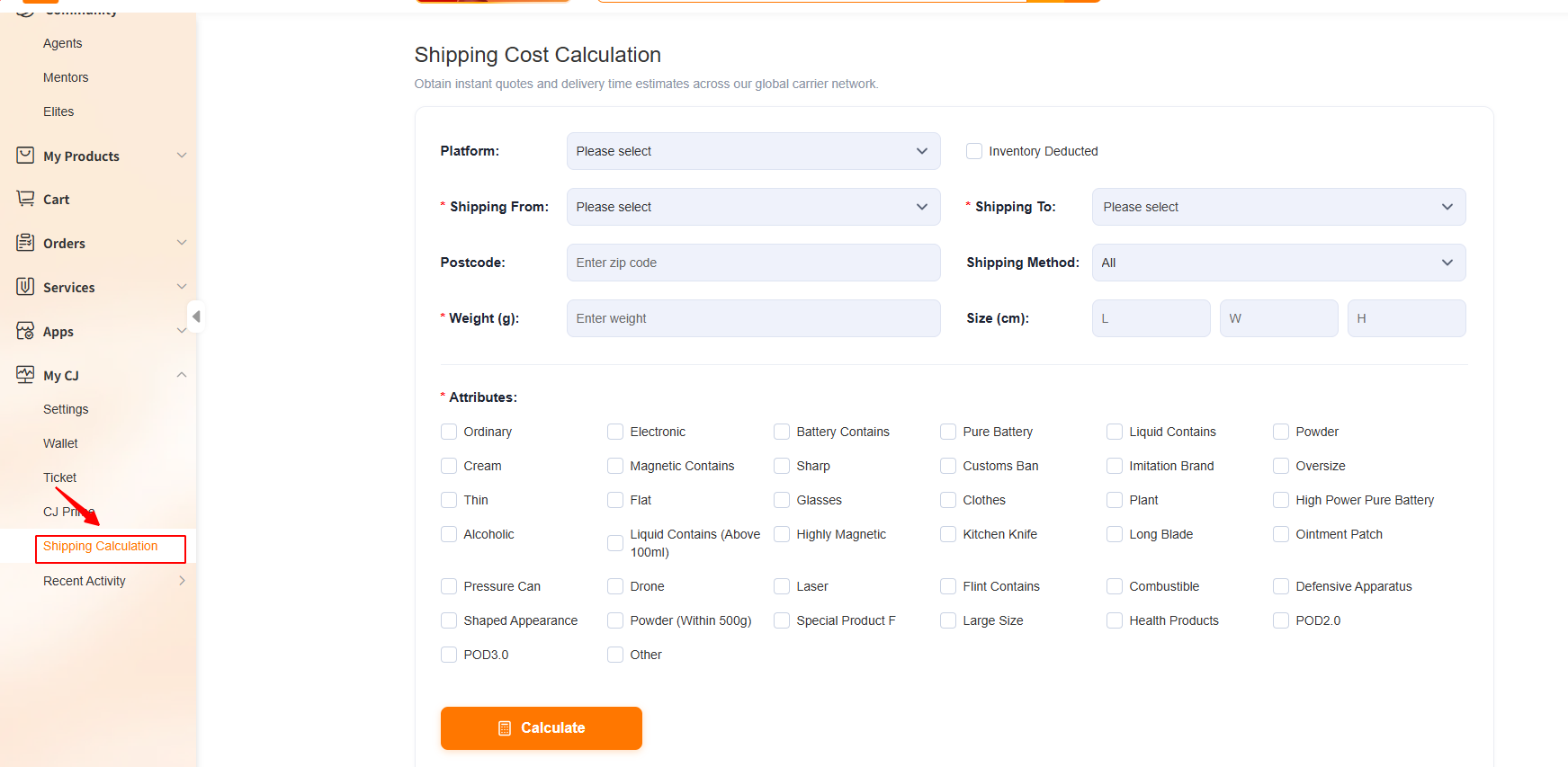
CJ provides two resources that can help you start:
The service fee page provides information about applicable warehouse and service charges. Shipping costs depend on the product, route, destination, and available service, so check the current quote for your specific order.
Reference prices can change. Review the current price shown in your account and the terms that apply to your arrangement.
What Should You Include in Your Cost Calculation?
Your cost structure depends on whether you ship directly from a supplier, use CJ inventory, or stock products in a US warehouse.
Use the following list as a starting point:
|
Cost category |
What to review |
|
Product cost |
Supplier price and product customization |
|
Inbound shipping |
Freight to the selected warehouse |
|
Import costs |
Applicable duties, taxes, customs clearance, and related charges |
|
Warehouse fees |
Receiving, storage, labeling, picking, packing, and other applicable services |
|
Last-mile shipping |
Delivery from the warehouse to the customer |
|
Platform and payment fees |
Marketplace, transaction, and payment processing charges |
|
Marketing |
Advertising, influencer fees, and affiliate commissions |
|
After-sales costs |
Expected refunds, replacements, returns, and support |
Not every item applies to every order. Check your quote carefully and avoid counting a fee twice if it is already included in another charge.
4. How to Put US Warehouse Capacity to Work
Moving inventory to a US warehouse is a business decision, not a requirement for every dropshipping store.
It may be useful when a product has steady demand and you can estimate how quickly the stock will sell. It also requires an upfront commitment, so start with a quantity you can comfortably fund.
Here is a five-step approach.
Step 1: Select Products With a Track Record
Start with a small group of products that sell consistently.
Look at more than total revenue. Review:
- Weekly order volume.
- Sales by size, color, or variant.
- Refund and return rates.
- Product reviews and support requests.
- Supplier reliability.
- Seasonal changes.
- Profit after advertising.
A product with steady sales and few customer complaints is often a better first candidate than a product with one short-lived sales spike.
For example, if a storage organizer sells 25–30 units each week across several months, it may be easier to forecast than a trend product that sold 200 units during one viral video and very little afterward.
Step 2: Estimate Landed Cost
Before purchasing inventory, estimate the cost of getting each unit ready to fulfill from the warehouse.
A basic formula is:
Landed cost per unit = product cost + allocated freight + applicable import costs + applicable inbound fees
Then add the costs that occur when the item is sold, such as warehouse handling, last-mile shipping, payment fees, and advertising.
Ask your CJ agent to clarify which charges apply to your product and where they appear in the quote.
Step 3: Choose Inventory Locations Based on Demand
Use your actual order history to decide where inventory should be stored.
If most customers are on the East Coast, compare New Jersey with other available options. If your orders are distributed across the country, compare one warehouse with a split inventory strategy.
A split can reduce the distance to some customers, but it also adds complexity. You may need more safety stock and more time to manage inventory across locations.
Before splitting stock, ask:
- Is order volume high enough to support multiple locations?
- How much will it cost to ship inventory to each warehouse?
- What happens if one location runs out?
- Can the store and fulfillment setup route orders as intended?
- Will the savings justify the additional inventory?
There is no universal split that works for every store. Start with the data you have and adjust after reviewing actual results.
Step 4: Set a Pilot Quantity
A pilot gives you time to learn the receiving process and measure real demand.
One way to estimate a starting quantity is:
Planned quantity = expected sales during replenishment + safety stock
For example:
- Average weekly sales: 30 units
- Estimated replenishment time: 4 weeks
- Safety stock: 30 units
The calculation would be:
30 × 4 + 30 = 150 units
This example assumes sales continue at roughly the same pace. If you expect a promotion, a seasonal peak, or a longer replenishment period, adjust the forecast.
Your available budget matters too. Do not commit more cash to inventory than your business can comfortably support.
Step 5: Set a Reorder Point
A reorder point tells you when to begin planning the next shipment.
Use the same formula:
Reorder point = expected sales during replenishment + safety stock
If your reorder point is 150 units, review the product when available inventory approaches that level. Confirm whether recent demand still supports the forecast before placing the next order.
Revisit the calculation regularly. If sales increase from 30 to 50 units per week, the original reorder point may no longer provide enough coverage.
Suggested visual: Create an original chart showing inventory decreasing over time, the reorder point, and the expected arrival of new stock. Label all numbers as an example.
5. A Weekly Operations Checklist for Growing Stores
The value of these CJdropshipping news updates comes from using them in your daily operations.
You do not need a complicated reporting system to start. A spreadsheet with your main products, stock levels, costs, and recent sales can provide useful visibility.
Review Inventory
Once a week:
- Check available stock for your best-selling products.
- Review sales by variant.
- Identify products approaching their reorder points.
- Check whether a promotion is likely to increase demand.
- Confirm that your store’s displayed quantities reflect the inventory available for fulfillment.
Review Fulfillment
Look for patterns rather than isolated issues.
Ask:
- Are orders being processed as expected?
- Are warehouse and product connections correct?
- Are tracking updates appearing?
- Are certain destinations generating more delivery questions?
- Are there recurring packaging or product-quality complaints?
If the same problem appears repeatedly, document the order examples and contact your fulfillment team or CJ agent.
Review Costs
Compare your estimated costs with actual results.
For each main product, review:
- Supplier price.
- Shipping quotes.
- Warehouse charges.
- Average advertising cost per order.
- Refund and replacement costs.
- Discounts and promotional spending.
If costs increase, update your calculations before deciding whether to change your selling price or advertising budget.
Review Your TikTok Shop Setup
For TikTok Shop products:
- Check the connected warehouse.
- Review product and variant mappings.
- Confirm that pickup details are current.
- Check the inventory sync setting for each relevant warehouse.
- Review handling times and platform notices.
- Recheck scheduled listings after they go live.
A short review each week can make it easier to find issues before they affect a large number of orders.
What Should Different Sellers Do Next?
If You Are Testing New Products
Focus on product validation and cost visibility.
You may not have enough sales data to justify purchasing inventory for a US warehouse yet. Compare available fulfillment options, check product quality, and calculate your expected margin first.
Once a product shows more consistent demand, review whether local inventory makes sense.
If You Have Steady US Orders
Export your order history and identify where your customers live.
Then choose one or two proven SKUs and compare:
- Your current fulfillment cost.
- Estimated inbound cost to a US warehouse.
- Domestic shipping costs.
- Expected delivery options.
- The cash required to hold inventory.
Use those numbers to decide whether a small warehouse pilot is worthwhile.
If You Sell on TikTok Shop
Review your warehouse and inventory connections before increasing traffic.
If you use a supplier warehouse, check whether the location appears in your store’s inventory sync settings. If it does not, speak with your account manager and keep quantities updated through the appropriate process.
For upcoming launches, add the post-publication sync check to your launch plan.
If You Are Preparing for a Seasonal Campaign
Work backward from your planned promotion date.
Allow time for:
- Product purchasing.
- Freight to the warehouse.
- Customs processing, where applicable.
- Warehouse receiving.
- Inventory confirmation.
- Store and SKU connections.
- A final fulfillment check before advertising.
Ask for current timelines and receiving instructions before confirming your launch schedule.
Take the Next Step With CJdropshipping
The updates in this CJdropshipping news roundup are designed to help sellers make informed decisions about inventory, fulfillment, and costs.
The second New Jersey warehouse adds East Coast capacity. Expanded TikTok Shop platform logistics support gives eligible sellers more warehouse options. CJ’s cost tools can help you compare your expenses before committing more money to advertising.
Choose one practical next step for your business: review your customer locations, check a TikTok warehouse connection, or calculate the real cost of one of your best-selling products.
New to CJdropshipping? Create your CJdropshipping account to explore products and review fulfillment options for your store.
Frequently Asked Questions
1. What is the latest CJdropshipping warehouse update?
CJdropshipping has opened a second warehouse in New Jersey with 120,000 square feet of space. The facility adds East Coast capacity for sellers who want to explore US inventory storage and fulfillment. Availability, costs, and delivery options depend on the product and selected service.
2. Can I use TikTok Shop platform logistics with a CJ warehouse?
Eligible CJ warehouses and supplier warehouses that support self-pickup can be used for TikTok platform logistics, subject to the applicable setup and eligibility requirements. Check that the warehouse, pickup details, product connection, and shipping settings are correct before processing orders.
3. Does supplier-warehouse inventory automatically sync to TikTok Shop?
It depends on your store’s activation status and the inventory sync options available in your account. Check whether the supplier location appears in your TikTok inventory sync settings. If it does not, contact your CJ account manager and maintain store-side quantities through the appropriate manual process until the setup is confirmed.
4. Where can I check CJdropshipping warehouse and shipping fees?
You can review applicable reference charges on the CJdropshipping Service Fee page and use the shipping calculator to explore shipping estimates. Confirm current rates for your product, destination, and service before making an inventory decision.
5. Should I move all my products to a US warehouse?
A small pilot is usually easier to evaluate. Start with products that have consistent demand, reliable suppliers, and a clear margin after all relevant costs. Estimate how much inventory you need during replenishment, add suitable safety stock, and review actual performance before expanding.