
Learning how to dropship on Shopify can feel more complicated than it really is. You need a store, products, suppliers, payment methods, shipping rules, marketing, and customer service—all before your first order arrives.
But the basic model is simple: you sell a product without keeping it in your own warehouse. When a customer orders, your supplier fulfills and ships the product on your behalf.
The important part is what happens around that simple process.
Successful Shopify dropshipping for beginners is less about finding a secret product and more about building a reliable system: choosing products carefully, working with dependable suppliers, calculating margins before advertising, setting realistic delivery expectations, and giving customers a reason to buy from your store instead of dozens of competitors.
This guide walks through that process from the beginning.
1. What Is Dropshipping?
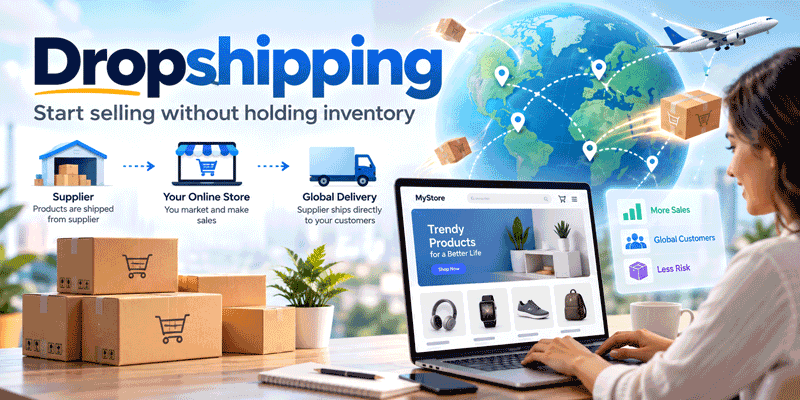
Dropshipping is a retail fulfillment model where you sell products without purchasing and storing inventory before customers order them.
A basic dropshipping order looks like this:
Customer → Your Shopify Store → Supplier → Customer
Here is what happens in practice:
-
A customer visits your Shopify store.
-
They purchase a product for your retail price.
-
You send the order information to your supplier.
-
You pay the supplier's product and shipping costs.
-
The supplier packs and ships the order directly to your customer.
-
You handle communication, refunds, returns, and customer support.
For example, suppose you sell a pet accessory for $39.99.
Your supplier charges:
-
Product: $11
-
Shipping: $7
-
Total fulfillment cost: $18
At first glance, you might think your profit is:
$39.99 - $18 = $21.99
It isn't.
You still need to account for payment processing, advertising, Shopify fees, apps, refunds, discounts, and other operating expenses.
That distinction becomes extremely important once you start buying traffic.
2. How Dropshipping Works on Shopify Specifically
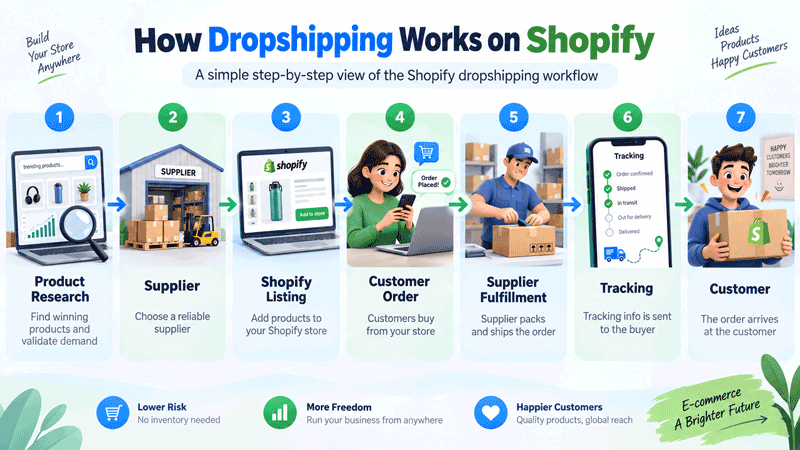
If you are wondering how does Shopify dropshipping work, think of Shopify as the operating system of your ecommerce store.
Shopify itself usually isn't your product supplier. It gives you the infrastructure to build a storefront, collect payments, manage products, receive orders, communicate with customers, and connect to third-party apps and suppliers.
Shopify officially supports dropshipping workflows through third-party supplier integrations and apps.
A typical Shopify dropshipping workflow looks like this:
Product research → Supplier → Shopify listing → Customer order → Supplier fulfillment → Tracking → Customer
Suppose you connect your store to a fulfillment platform.
You find a product inside the platform and publish it to Shopify. A customer later orders that product from your store.
Depending on the integration, the order can appear automatically in your supplier dashboard. You confirm or pay for fulfillment, the supplier processes the package, and tracking information can be synchronized back to Shopify.
Apps can automate much of the administrative work, but they do not automate business judgment.
You still need to decide:
-
What products to sell
-
Which supplier to trust
-
How much to charge
-
How to advertise
-
When to stop testing a weak product
-
How to respond when shipping goes wrong
Automation saves clicks. It doesn't replace strategy.
3. Pros and Cons of Shopify Dropshipping
Dropshipping removes some of the biggest barriers to traditional retail, but it creates new trade-offs.
| Advantages | Disadvantages |
|---|---|
| No need to buy large quantities of inventory upfront | Less control over fulfillment |
| Lower risk of unsold stock | Supplier mistakes affect your reputation |
| Easy to test multiple products | Popular products can become highly competitive |
| No warehouse required for pure dropshipping | Shipping times vary by supplier and destination |
| Large range of products available | Margins can become thin after advertising |
| Shopify makes store setup relatively accessible | Refunds and chargebacks still belong to you |
| Can transition into inventory-based fulfillment later | Product quality may vary unless you test samples |
The biggest beginner mistake is focusing only on the left column.
Dropshipping reduces inventory risk. It does not remove business risk.
You can still lose money through unsuccessful ads, refunds, poor-quality products, unreliable suppliers, payment disputes, software subscriptions, and unrealistic pricing.
Think of dropshipping as a fulfillment method, not a guaranteed business formula.
4. What You Need Before You Start
You don't need a warehouse or thousands of products. You do need three things: enough budget to test, enough time to learn, and realistic expectations.
Budget
A very lean store might technically launch for well under $200, particularly if you use free themes and organic marketing.
But launching a website and properly testing a business are different things.
A more realistic beginner budget might include:
-
Shopify subscription
-
Domain
-
Product samples
-
Optional apps
-
Creative production
-
Advertising tests
-
Refund/emergency reserve
If paid advertising is your main acquisition strategy, expect marketing to become your largest variable expense.
Time
Don't expect the store to become passive after one weekend.
During the beginning, you may spend time on:
-
Product research
-
Supplier comparison
-
Store design
-
Product pages
-
Video creation
-
Advertising
-
Analytics
-
Customer support
-
Fulfillment monitoring
Even automated stores need supervision.
Mindset
Treat your first products as tests.
You are looking for evidence that customers want the offer at a price that leaves enough margin after acquisition and fulfillment costs.
A product failing does not necessarily mean dropshipping doesn't work. At the same time, continuing to spend money on a product with consistently poor economics is not persistence—it's poor risk management.
5. Step-by-Step: Setting Up Your Shopify Dropshipping Store
Step 1: Register for Shopify and Choose a Plan
Start by creating a Shopify account.
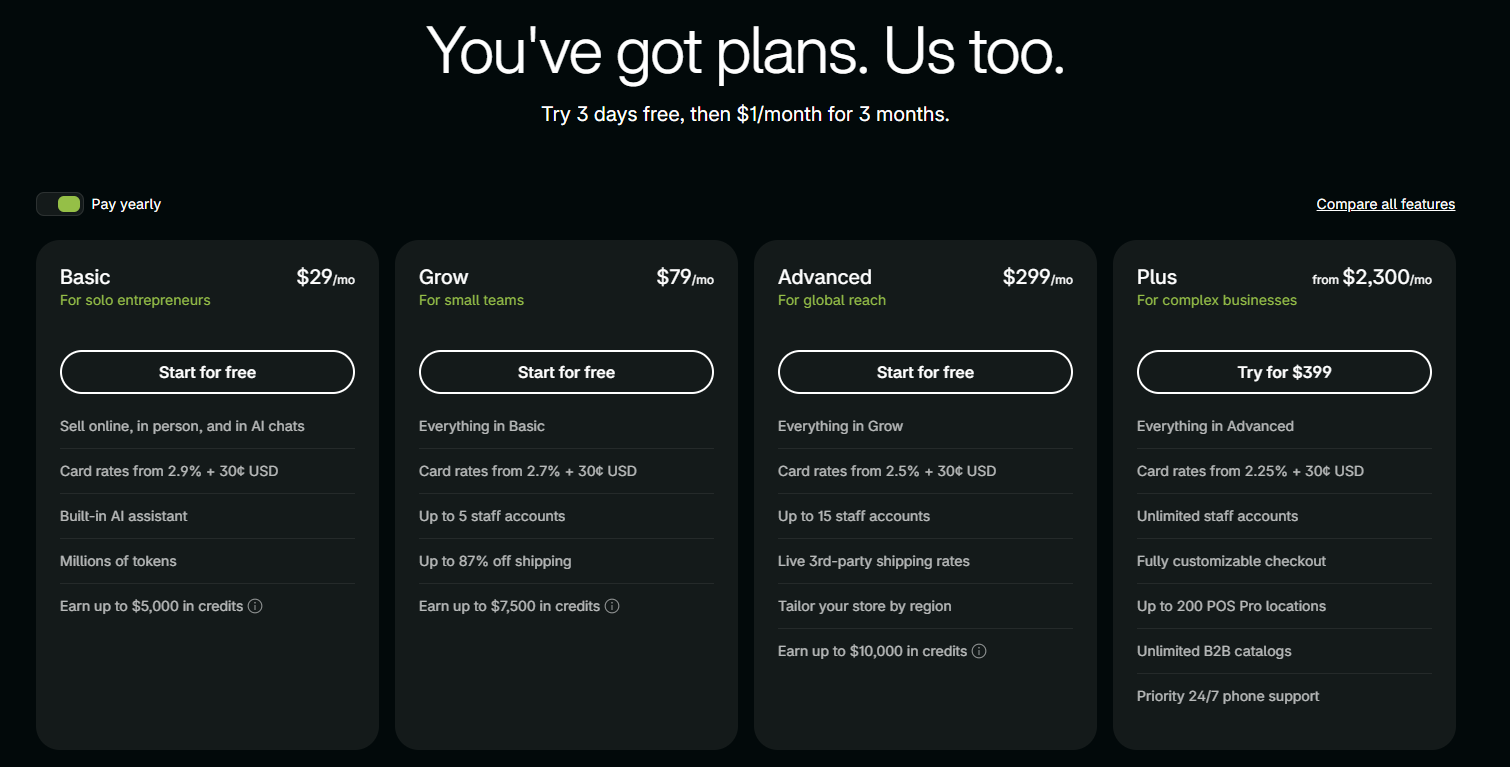
At the time of writing, Shopify's U.S. pricing page advertises a 3-day free trial followed by three months at $1 per month for eligible new users. Shopify's Basic plan is listed at $39 per month when paid monthly or $29 per month when billed yearly. Trial lengths and promotions can vary, so check the offer displayed when you register rather than assuming today's promotion will always be available.
For most first-time dropshippers, the Basic plan is enough to begin.
You do not need an expensive plan simply because you intend to dropship.
During your trial:
-
Choose your store name.
-
Explore Shopify's admin dashboard.
-
Add a test product.
-
Learn where Orders, Products, Customers, Analytics, Settings, and Online Store are located.
-
Connect your supplier app later.
Don't spend your entire trial changing button colors. Your offer matters more than tiny design details.
Step 2: Choose a Niche
A niche gives your store a more specific customer and product direction.
Compare these two concepts:
Broad: Home products
More focused: Space-saving home organization products for apartment renters
The second gives you clearer ideas for products, content, advertising, and customer problems.
Before choosing a niche, ask:
| Question | What You Want to See |
|---|---|
| Is there existing demand? | Customers already buying similar products |
| Can the products solve a recognizable problem? | Easy-to-understand customer benefit |
| Is there enough product depth? | Multiple related products you could sell later |
| Can you create content around it? | Demonstrations, comparisons, tutorials |
| Is shipping practical? | Reasonable size, weight, and fragility |
| Are returns manageable? | Fewer sizing or compatibility issues |
| Is it heavily regulated? | Prefer simpler categories as a beginner |
Use Google Trends, marketplaces, social media, competitor stores, and keyword research to see whether consumers are actively interested.
Avoid choosing a niche simply because someone called it "untapped."
If nobody is selling something, sometimes there is an opportunity. Sometimes there is simply no demand.
Step 3: Find and Validate Products
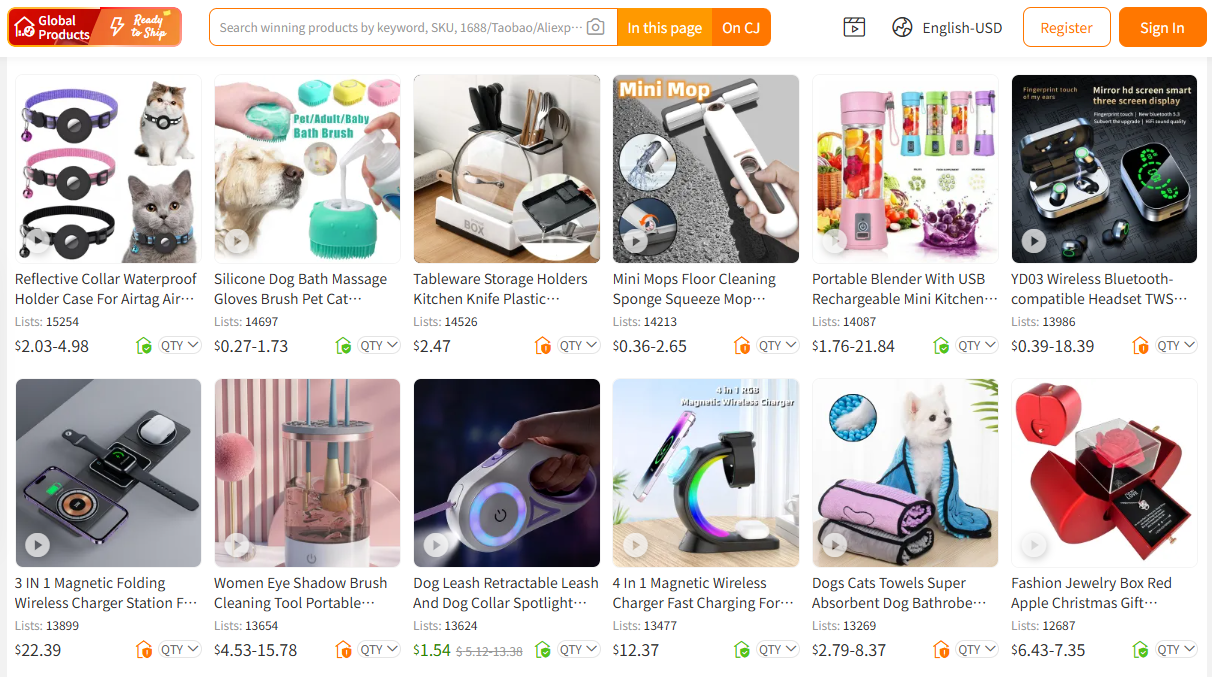
Finding products should involve more than scrolling through TikTok until something looks viral.
Useful research sources include:
-
AliExpress and DSers
-
TikTok
-
Instagram Reels
-
Meta Ad Library
-
Amazon
-
Google Trends
-
Supplier catalogs
-
Competitor stores
-
Product research platforms such as Minea
Minea, for example, provides a database for researching ecommerce ads, products, shops, and advertising trends.
Use these tools as signals—not proof.
A product repeatedly appearing in advertisements can mean demand exists. It can also mean competition is already intense.
Evaluate products using a simple scorecard:
| Factor | Questions |
|---|---|
| Demand | Are people actively interested? |
| Problem | Does it solve something meaningful? |
| Demonstration | Can its value be shown quickly? |
| Selling price | Is there room for a reasonable retail price? |
| Fulfillment cost | Product + shipping cost? |
| Competition | How many similar stores are selling it? |
| Content potential | Can you create several different ad angles? |
| Return risk | Does sizing, compatibility, or fragility create problems? |
| Supplier quality | Can you find more than one viable source? |
Before scaling, order a sample.
A product page cannot compensate for a product you have never inspected and would not personally feel comfortable sending to a customer.
Step 4: Choose a Dropshipping Supplier
The best dropshipping suppliers are not necessarily the ones with the lowest product price.
Your supplier affects:
-
Product quality
-
Inventory
-
Processing speed
-
Packaging
-
Shipping
-
Tracking
-
Refunds
-
Customer experience
Four commonly considered options for Shopify sellers are:
| Supplier/Platform | Better Fit For | Main Consideration |
|---|---|---|
| DSers / AliExpress | Beginners wanting access to a large marketplace catalog | Supplier quality and shipping can vary, so individual suppliers need verification |
| Spocket | Sellers interested in US/EU and global supplier options | Product and subscription costs should be compared against your target margin |
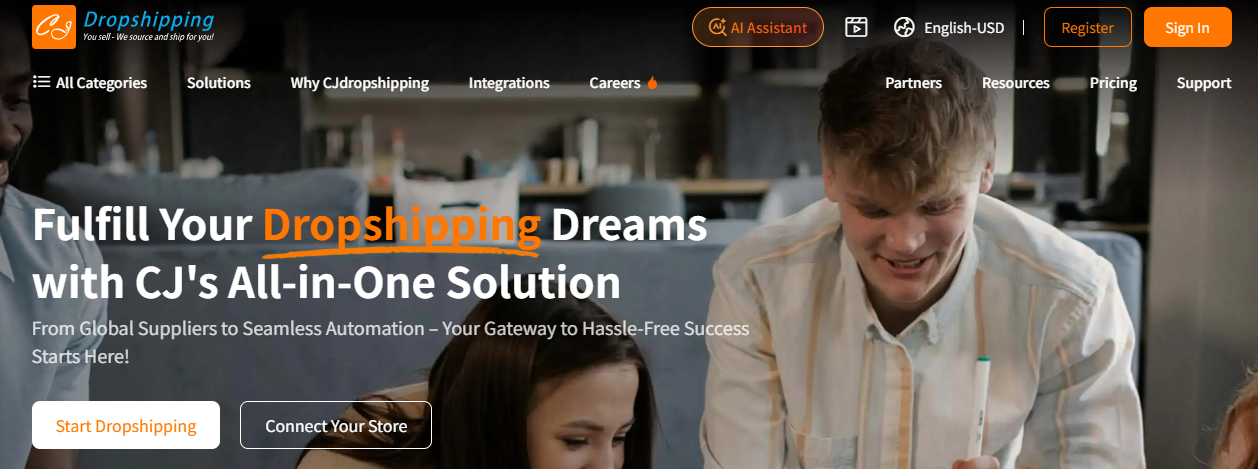
| CJdropshipping | Sellers wanting sourcing, Shopify integration, fulfillment, shipping options, and potential branding support | Compare each product's cost, warehouse availability, processing time, and route |
| Zendrop | Sellers wanting integrated Shopify sourcing and automated fulfillment workflows | Check available products, pricing, shipping, and plan features before committing |
DSers connects Shopify stores with sourcing and order workflows including AliExpress, while Spocket emphasizes access to US, EU, and global suppliers. CJdropshipping supports Shopify product and order synchronization and fulfillment, while Zendrop also offers Shopify product importing and fulfillment automation.
What to Check Before Choosing
For every serious product, ask your supplier:
-
Where does the product ship from?
-
What is the processing time?
-
What is the estimated delivery range?
-
Is tracking available?
-
What happens if inventory runs out?
-
How are damaged products handled?
-
Can I order samples?
-
Are custom packaging options available later?
-
Is there a backup supplier?
-
What happens when order volume increases?
Never choose solely because one supplier is $1 cheaper.
A slightly more expensive supplier that consistently delivers may save far more in refunds and support problems.
Step 5: Import Products and Write Listings That Convert
Supplier integrations can import titles, variants, descriptions, and images into Shopify.
That does not mean you should publish the imported listing unchanged.
Supplier titles often look like:
Multifunction Portable Household Pet Dog Cat Hair Remover Cleaning Brush New Design
Rewrite that into something a customer can understand:
Reusable Pet Hair Remover for Sofas, Bedding & Car Seats
Your product page should answer five questions quickly:
-
What is this?
-
Who is it for?
-
What problem does it solve?
-
Why should I trust it?
-
What happens after I order?
A strong product page normally includes:
Clear Product Title
Prioritize clarity over keyword stuffing.
Benefit-Focused Description
Don't only write:
Made from durable ABS material.
Explain why it matters:
Durable construction makes it suitable for repeated everyday cleaning.
Good Visuals
Use clear supplier assets when you have permission, but original product photos and videos are much stronger for building a distinctive brand.
Specifications
Include dimensions, materials, package contents, compatibility, and care instructions where relevant.
Shipping Information
Don't hide delivery estimates until checkout.
Reviews
Use genuine customer feedback only. Never manufacture testimonials to make a new store look established.
Step 6: Build the Store
For your first store, simplicity beats complexity.
Choose a clean, mobile-friendly Shopify theme and build around the buying journey.
Your navigation might include:
Home | Shop | About Us | FAQ | Contact
Essential pages include:
-
Home
-
Product pages
-
About
-
Contact
-
FAQ
-
Shipping Policy
-
Refund Policy
-
Privacy Policy
-
Terms of Service
You may also add apps for:
-
Supplier integration
-
Reviews
-
Email marketing
-
Analytics
-
Upsells
-
Customer support
But avoid installing 15 apps before you have 15 customers.
Every unnecessary app adds potential cost, complexity, and sometimes additional scripts that can affect site performance.
Trust is also more than adding a row of "secure checkout" icons.
Useful trust signals include:
-
Accurate shipping information
-
Professional product images
-
Working contact information
-
Clear refund terms
-
Secure checkout
-
Consistent branding
-
Genuine reviews
Step 7: Price Products for Profit
One of the most dangerous beginner rules is:
Cost $10? Sell for $20.
That ignores nearly every other expense.
A better starting formula is:
Selling Price - Product Cost - Shipping - Payment Fees - Customer Acquisition Cost - Refund/Operating Allowance = Estimated Profit
Imagine this order:
| Item | Cost |
|---|---|
| Selling price | $49.99 |
| Product | -$13.00 |
| Shipping | -$6.00 |
| Payment processing | -$1.75 |
| Advertising cost per sale | -$17.00 |
| Refund/operating allowance | -$3.00 |
| Estimated contribution | $9.24 |
Your gross margin before advertising looks attractive.
Your real margin is much smaller.
This is why you should understand unit economics before scaling a campaign.
Increasing revenue while losing $5 on every order only helps you lose money faster.
Step 8: Configure Payments, Shipping, and Basic Taxes
Go to Shopify's Settings area and configure your payment provider.
Shopify Payments may be available depending on your country. Otherwise, Shopify supports third-party payment providers.
Then build shipping rules based on what your supplier can actually provide.
You might offer:
-
Free shipping built into the retail price
-
Flat-rate shipping
-
Free shipping above an order threshold
Avoid promising "3-day delivery" because it sounds good if your supplier normally takes considerably longer.
Taxes
Taxes are more complicated because obligations depend on where your business operates, where customers are located, and potentially where suppliers operate.
In the U.S., sales-tax obligations can depend on nexus. Cross-border sellers may face different VAT, customs, and registration requirements. Shopify specifically warns dropshippers to investigate applicable tax and customs rules rather than assuming Shopify automatically handles every legal obligation.
For anything specific to your business, use a qualified tax professional rather than a generic dropshipping tutorial.
Step 9: Create Policies and Check Legal Basics
Dropshipping itself is a legitimate fulfillment model, but using dropshipping does not remove your responsibility as the retailer.
Shopify states that merchants using dropshipping must comply with relevant laws and regulations in the locations where their businesses and customers operate.
At minimum, review:
Refund Policy
Explain:
-
Return window
-
Eligible conditions
-
Damaged products
-
Refund timing
-
Return process
Shipping Policy
Include:
-
Processing times
-
Typical delivery ranges
-
Tracking
-
Potential delays
-
International considerations
Privacy Policy
Explain how customer information is collected and processed.
Do not copy another store's legal pages word for word. Your policies need to reflect how your business actually operates.
Also be careful with regulated products, trademarks, copyrighted designs, health claims, and counterfeit goods.
Step 10: Place a Test Order and Launch
Before sending visitors to the store, test the customer journey yourself.
Check:
-
Mobile navigation
-
Product variants
-
Add-to-cart button
-
Discount codes
-
Shipping rates
-
Checkout
-
Payment processing
-
Confirmation emails
-
Supplier synchronization
-
Fulfillment
-
Tracking
-
Contact forms
Ideally, order your own product.
A test order can reveal problems that three hours of staring at the Shopify editor will never show you.
Once the workflow works, remove storefront password protection if applicable and launch.
6. Marketing Your Store
Building a store doesn't generate traffic automatically.
You need a customer acquisition plan.
Free Traffic: TikTok Organic
Short-form video works particularly well for products that can be demonstrated visually.
Instead of posting:
Buy this amazing product now!
Create content showing:
-
A problem
-
The product solving it
-
Before/after situations
-
Unexpected uses
-
Comparisons
-
Tutorials
-
Common mistakes
Test multiple hooks.
The product may be identical, but changing the first three seconds of a video can completely change viewer behavior.
Free Traffic: SEO
SEO takes longer but can build traffic that does not require paying for every click.
Create content around search intent:
-
How-to guides
-
Comparisons
-
Product tutorials
-
Buying guides
-
FAQs
-
Troubleshooting articles
For example, a store selling pet travel accessories might target searches such as:
-
how to travel with a dog in a car
-
best travel accessories for dogs
-
how to keep car seats clean with pets
[Related: ecommerce SEO for beginners]
Paid Traffic: Meta Ads
Meta Ads can help you test offers faster, but don't start by spending heavily.
Test combinations of:
-
Creative
-
Hook
-
Offer
-
Landing page
-
Audience
Measure business results—not likes.
Watch:
-
Cost per click
-
Add-to-cart rate
-
Conversion rate
-
Cost per acquisition
-
Average order value
-
Profit per order
Paid Traffic: TikTok Ads
TikTok ads often depend heavily on creative quality.
Make advertisements feel native to the platform instead of turning every video into a polished television commercial.
Test several creatives before assuming the product itself is the problem.
Most importantly, set a testing budget you can afford to lose.
Advertising is experimentation, not guaranteed purchasing of customers.
7. Fulfilling Orders and Handling Customer Service
When a customer purchases, your work isn't over.
You are still responsible for the customer relationship.
With many supplier integrations, orders and tracking can synchronize between Shopify and the fulfillment platform. For example, DSers documents a workflow where paid Shopify orders appear in DSers before the merchant places and pays for the supplier order.
Monitor orders regularly for:
-
Failed fulfillment
-
Inventory shortages
-
Address problems
-
Tracking delays
-
Supplier messages
If Shipping Is Delayed
Contact the supplier first and get concrete information.
Then contact the customer before they need to chase you.
If Tracking Stops Updating
Investigate with the carrier or supplier and explain the situation clearly. If the shipment is considered lost, follow your stated replacement/refund policy.
If a Customer Wants a Refund
Follow your published refund policy. Don't invent different rules after receiving the request.
If You Receive a Negative Review
Don't immediately argue with the customer.
Find out what happened, fix anything that can reasonably be fixed, and use repeated complaints as operational feedback.
If five customers complain about the same issue, that isn't a customer-service problem anymore. It is a product, supplier, or expectations problem.
8. Common Mistakes Shopify Dropshipping Beginners Make
1. Choosing Products Only Because They Are Viral
Problem: Viral content may indicate demand, but it can also indicate saturation.
Fix: Validate margin, competition, shipping, supplier quality, and customer need before testing.
2. Never Ordering the Product
Problem: You can't properly judge quality or create original content.
Fix: Order samples before increasing advertising spend.
3. Hiding Long Shipping Times
Problem: Customers become frustrated when reality differs from expectations.
Fix: Give realistic delivery estimates before checkout.
4. Copying Supplier Product Pages
Problem: Your store looks identical to every competitor using the same catalog.
Fix: Rewrite titles and descriptions around your customer's problem and produce original creative whenever possible.
5. Looking at Revenue Instead of Profit
Problem: A store can generate $20,000 in revenue while barely breaking even—or losing money.
Fix: Track contribution margin and net profit.
6. Installing Too Many Apps
Problem: Costs and technical complexity grow before revenue does.
Fix: Add apps only when they solve an actual operational need.
7. Scaling Ads Too Early
Problem: More advertising magnifies weak economics.
Fix: Verify conversion rate, acquisition cost, fulfillment reliability, and margin first.
8. Depending on One Supplier Forever
Problem: A stockout can stop your entire business.
Fix: Identify backup suppliers for successful products and consider purchasing inventory once demand is more predictable.
9. How Much Does It Really Cost to Start?
There is no universal minimum budget, but this gives you a more useful planning framework.
Typical Fixed and Setup Costs
| Expense | Typical Beginner Range |
|---|---|
| Shopify Basic | $39/month monthly, or lower effective monthly price when billed annually at current U.S. pricing |
| Domain | Roughly $10–$25/year |
| Theme | $0–$300+ |
| Apps | $0–$100+/month |
| Product samples | $30–$150+ |
| Basic creative tools | $0–$50+/month |
Shopify pricing and promotional offers can change, so verify the current rate before budgeting.
Marketing Budget
Your marketing cost depends heavily on the acquisition channel.
Organic-First
Possible initial marketing spend: $0–$200
You invest more time creating TikTok, Reels, SEO content, and community content.
Small Paid Testing
Possible testing budget: $300–$1,000
Enough to run controlled experiments, but still not a guarantee of finding a profitable product.
Larger Testing Program
$1,000+
Useful only if you understand what data you are collecting and how you will decide whether to continue or stop.
Keep a separate reserve for refunds and unexpected supplier issues.
Never spend money required for essential personal expenses on advertising tests.
10. Is Shopify Dropshipping Still Worth It in 2025?
Yes—but probably not for the reason many beginners expect.
And the same answer continues to apply beyond 2025.
Dropshipping can still be useful because it allows sellers to test products without immediately buying large quantities of inventory.
What has become harder is building a generic store, copying supplier images, running one advertisement, and expecting easy profits.
Customers expect more.
Competition is stronger.
Creative quality matters.
Shipping expectations matter.
Brand trust matters.
Customer acquisition costs matter.
The sellers with the strongest long-term position often use dropshipping as a testing stage rather than the final version of the business:
Dropship → Validate Demand → Improve Supplier Terms → Buy Inventory → Use Faster Warehousing → Improve Packaging → Build a Brand
A platform such as CJdropshipping can also support a workflow that begins with Shopify integration and individual order fulfillment before moving toward sourcing, inventory, or broader fulfillment arrangements where appropriate. Its Shopify integration supports product and order synchronization between the systems.
So, is dropshipping worth trying?
It can be—if you want to learn ecommerce while limiting initial inventory exposure.
It is not worth it if your plan depends on effortless passive income.
11. Shopify Dropshipping FAQ
Can You Really Dropship on Shopify?
Yes. Shopify supports dropshipping businesses and can connect to third-party supplier and fulfillment apps. You remain responsible for your store, customers, legal compliance, product selection, and customer experience.
How Much Money Do I Need to Start Dropshipping on Shopify?
You can technically start with a small amount, especially if you use free themes and organic marketing. A more realistic budget should include Shopify, a domain, samples, apps if needed, marketing, and a refund reserve.
If you use paid ads, the required testing budget rises substantially.
Do I Need to Buy Inventory First?
Not for traditional dropshipping.
You normally purchase fulfillment from the supplier after the customer has ordered.
However, successful sellers sometimes later buy inventory for proven products to improve pricing, stock stability, customization, or delivery speed.
What Are the Best Dropshipping Suppliers for Shopify?
There is no single best supplier for every store.
DSers/AliExpress, CJdropshipping, Spocket, Zendrop, and other supplier networks serve different needs.
Compare:
-
Product quality
-
Total landed cost
-
Processing time
-
Shipping
-
Warehouse location
-
Tracking
-
Shopify integration
-
Support
-
Returns
-
Branding options
The supplier with the cheapest item price is not automatically the most profitable choice.
Can I Use CJdropshipping With Shopify?
Yes. CJdropshipping offers a Shopify integration that supports connecting the store, listing products, synchronizing orders, and managing fulfillment through CJ's system.
You should still evaluate every product individually, including sourcing price, shipping method, delivery estimate, warehouse availability, and expected margin.
Is Shopify Dropshipping Legal?
Dropshipping is generally a legal retail fulfillment method, but merchants must follow applicable business, consumer protection, product safety, intellectual-property, tax, advertising, privacy, and other laws in the markets where they operate. Shopify explicitly states that dropshipping merchants remain responsible for compliance.
Requirements vary by jurisdiction, so obtain professional advice when needed.
How Are Shopify Dropshipping Orders Fulfilled?
Usually, the customer orders through Shopify, the order is sent or synchronized to your supplier platform, you pay for fulfillment, and the supplier ships the product.
Tracking can then be synchronized back to Shopify depending on the integration.
Is Shopify Dropshipping Profitable for Beginners?
It can be profitable, but there is no guaranteed margin or timeline.
Profit depends on factors including:
Selling price - product cost - shipping - payment fees - advertising - refunds - software - overhead
A product generating many orders can still be unprofitable if acquisition and fulfillment costs are too high.
12. Conclusion: Your Next Step
If you want to dropship on Shopify, don't begin by building a 100-product store.
Start smaller.
Choose one customer group.
Research several product ideas.
Shortlist two or three.
Compare suppliers.
Order samples.
Build one strong product page.
Set up your policies, payments, shipping, analytics, and fulfillment workflow.
Then place a test order yourself.
Once everything works, start generating traffic with a controlled budget or an organic content plan.
Your first goal is not to create a million-dollar store.
Your first goal is to prove that you can take a customer from:
Seeing your product → Visiting your store → Purchasing → Receiving the order → Being satisfied with the experience
Once that system works consistently, you have something worth scaling.