
-
1、What can I do if I failed to authorize my WooCommerce?

For "incorrect 'key' or 'secret'", you need new keys at WooCommerce >> Settings >> Advanced >> REST API. Then, authorize WooCommerceto CJ again.
Please submit a Ticket to CJ Management Team with your WooCommerce login URL, username, and password if you are having difficulties with the authorization.
-
2、Some of the variants are missing even I have provided the link of the product for the sourcing request.
You can submit a ticket, contact our customer support(support@cjdropshipping.com), or consult an online agent in the chatroom, and your request will be forwarded to the sourcing team and shall be handled within 2 working days.
The product will be updated if the variants are available.
And last but not the least, please don't forget to tell us your sourcing ID!
-
3、What if there are missing variants of my sourcing result?
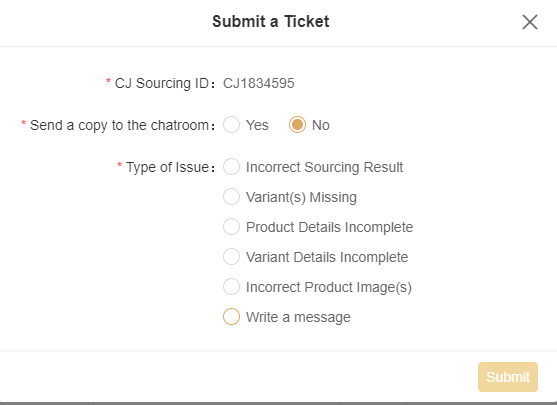
You can submit a ticket to our sourcing team and we will deal with it as the type of issue. If you are urgent, you can also send a copy to the chatroom for a quick reply.
-
4、Can I talk to the sourcing team?
You can give your feedback on the sourcing result by submitting a ticket to the sourcing. Our sourcing team will improve the result based on the type of issue or your message.
-
5、How can I have my personal agent?
Due to the rapidly increasing number of new users on CJ, it becomes a necessity for CJ to evaluate how active a user is before a personal agent can be assigned.
The activity of your account will be evaluated by our system and the agent team, mostly based on the number of your orders.
If you're facing difficulties using our platform, you can always submit a ticket, contact our customer support (support@cjdropshipping.com), or consult our online agents in the chatroom.
${item.text}
${item.title}
${item.afterBtn.text}